
How Browser Extensions Add New Features to Web Browsers
Introduction
Web browsers have become one of the most important tools in modern digital life. People use browsers every day for searching information, watching videos, shopping online, studying, working, and communicating with others. Popular browsers such as Chrome, Firefox, Edge, and Safari already provide many useful features, but users often need additional tools to make their browsing experience easier and more productive. This is where browser extensions become useful.
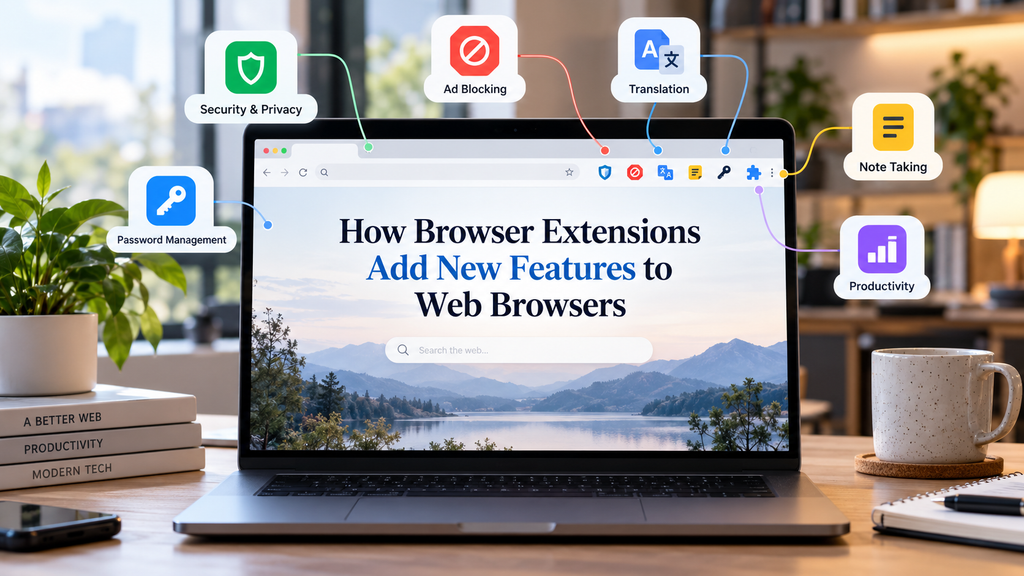
Browser extensions are small software programs that add new features and abilities to web browsers. They allow users to customize their browsers according to their personal needs. Whether someone wants better privacy, improved productivity, language translation, password management, or easier access to online tools, browser extensions can provide simple solutions.
The growth of browser extensions has changed the way people interact with the internet. Instead of depending only on the features built into a browser, users can install additional tools that improve their online experience. Understanding how browser extensions work and how they add new features helps users make better choices while browsing the web.
What Are Browser Extensions?
A browser extension is a small application designed to work inside a web browser. It adds extra functions that are not available in the original browser. These extensions are usually created using web technologies such as HTML, CSS, and JavaScript, which are the same technologies used to build many websites.
When a user installs a browser extension, it becomes connected with the browser and can perform specific tasks. Some extensions change how websites look, while others add completely new tools. For example, a grammar checking extension can correct writing mistakes while typing online, and a password manager extension can help users save and manage login information securely.
Browser extensions are available through official extension stores provided by browser companies. Users can search for extensions based on their needs, install them, and remove them whenever they want.
How Browser Extensions Work
Browser extensions work by communicating with the browser and interacting with web pages. They use special permissions that allow them to perform certain actions. For example, an extension designed to block advertisements needs permission to analyze web page content and stop unwanted advertisements from appearing.
Most extensions contain different files that control their behavior. These files include instructions, design elements, and programming code. When the browser starts, it loads the extension and allows it to perform the tasks it was created for.
For example, a translation extension may detect a foreign language on a webpage and provide a translated version. A screenshot extension may add a new button to the browser toolbar that allows users to capture images of web pages.
The ability of extensions to connect with browsers makes them powerful tools. They do not replace the browser itself, but they improve its abilities by adding extra functions.
Improving Productivity Through Browser Extensions
One of the biggest advantages of browser extensions is improved productivity. Many people spend several hours every day using web browsers for work, education, and personal activities. Extensions can save time by making common tasks faster and easier.
For example, note taking extensions allow users to quickly save important information while browsing. Instead of opening another application, users can collect ideas, articles, and research notes directly from their browser.
Task management extensions help users organize their daily activities. They can create reminders, manage to do lists, and track important tasks without leaving the browser window.
Email management extensions can also improve productivity by providing quick access to messages and notifications. Professionals who handle many emails can use these tools to organize their communication more efficiently.
By reducing repeated actions and providing quick access to useful features, browser extensions help users complete tasks more effectively.
Enhancing Online Security and Privacy
Security and privacy have become major concerns for internet users. Every day, websites collect information about users, display advertisements, and track online behavior. Browser extensions can help users protect their personal information.
Privacy focused extensions can block tracking systems that monitor browsing activities. They can reduce unwanted data collection and provide users with more control over their online privacy.
Password manager extensions are another important example. Many people use multiple online accounts, and remembering different passwords can be difficult. Password manager extensions securely store passwords and help users create stronger login details.
Security extensions can also warn users about unsafe websites, suspicious links, and possible online threats. These tools provide an additional layer of protection while browsing the internet.
However, users should always install extensions from trusted sources because some harmful extensions may request unnecessary permissions or collect personal information.
Making Browsing More Comfortable
Browser extensions can improve the overall comfort of browsing. They allow users to personalize their browser according to their preferences.
For example, dark mode extensions change bright websites into darker designs, making them easier to view at night. Reading mode extensions remove unnecessary elements from web pages and create a cleaner reading environment.
Font adjustment extensions help users change text size and style according to their needs. These tools can be especially helpful for people who spend long hours reading online content.
Some extensions improve video watching experiences by adding extra controls, adjusting playback settings, or improving subtitles. These small improvements can make everyday browsing more enjoyable.
Helping Students and Researchers
Browser extensions have become valuable tools for students and researchers. The internet contains a huge amount of educational information, but finding and organizing useful content can be challenging.
Citation extensions help students create references for research papers and assignments. Instead of manually writing citation details, these tools can generate them automatically.
Dictionary and translation extensions help students understand difficult words and foreign languages. They allow users to learn new information without constantly switching between different applications.
Research organization extensions help users save articles, collect information, and manage online resources. These tools make studying and research more organized and efficient.
Supporting Businesses and Online Work
Many businesses depend on web browsers for daily operations. Browser extensions provide useful solutions for professionals working in different fields.
Marketing professionals use extensions to analyze websites, research keywords, and understand online trends. Sales teams use extensions to collect information and manage customer relationships.
Developers use browser extensions for testing websites, checking errors, and improving website performance. Designers use tools that help them analyze colors, layouts, and visual elements.
Remote workers also benefit from extensions that improve communication, time management, and online collaboration. These tools help employees work more efficiently from different locations.
Popular Types of Browser Extensions
There are many categories of browser extensions available today. Each type focuses on solving different problems.
Ad blocking extensions remove unwanted advertisements and improve page loading speed. They create a cleaner browsing experience by reducing distractions.
Security extensions protect users from unsafe websites and online threats. They help people browse with greater confidence.
Productivity extensions improve organization, time management, and workflow. They are popular among students, professionals, and business users.
Shopping extensions help users compare prices, find discounts, and discover better deals while shopping online.
Language extensions provide translation services, grammar correction, and vocabulary improvement tools.
Entertainment extensions add extra features to video platforms, music websites, and social media services.
Advantages of Using Browser Extensions
Browser extensions provide many benefits for users. The biggest advantage is customization. Every person uses the internet differently, and extensions allow users to create a browsing experience that matches their needs.
They also increase efficiency by reducing the time required for common tasks. Instead of using separate applications, users can access many tools directly inside their browsers.
Extensions can improve accessibility by providing features such as text adjustment, screen reading support, and translation services.
Another benefit is innovation. Independent developers and companies can create new tools that improve browsers beyond their original design.
Challenges and Risks of Browser Extensions
Although browser extensions offer many advantages, they also come with some risks. Users should be careful when installing new extensions because not all extensions are safe.
Some extensions request more permissions than they need. For example, a simple calculator extension should not require access to personal browsing history.
Poorly designed extensions can slow down browser performance. Installing too many extensions may increase memory usage and make the browser less responsive.
Users should regularly review installed extensions and remove those they no longer use. Keeping extensions updated is also important because updates often include security improvements.
The Future of Browser Extensions
The future of browser extensions looks promising as internet technology continues to develop. New extensions are expected to become smarter and more connected with artificial intelligence and automation tools.
AI powered browser extensions are already helping users summarize information, improve writing, organize tasks, and analyze online content. As artificial intelligence becomes more advanced, browser extensions may provide even more personalized experiences.
Future extensions may also focus more on privacy protection, faster workflows, and intelligent assistance. They will continue to transform browsers from simple viewing tools into powerful digital workspaces.
Conclusion
Browser extensions have changed the way people use web browsers. They add new features, improve productivity, strengthen security, and allow users to customize their online experience. From helping students research information to supporting professionals at work, browser extensions provide valuable solutions for many different needs.
The power of browser extensions comes from their ability to expand what a browser can do. Instead of accepting only the built in features, users can choose tools that make browsing easier, safer, and more efficient.
As technology continues to grow, browser extensions will remain an important part of the digital world. They represent a simple but powerful way to improve everyday internet use and create a more personalized browsing experience.

What Is Edge AI and Where Is It Being Used?

What Automation Software Can Do for Everyday Tasks

Understanding Software Updates and Why They Matter
About The Author
