
Understanding RAM and Its Role in Computer Performance
When we talk about computer performance, most people usually focus on the processor, graphics card, or storage drive. However, one important component that directly affects how smoothly a computer works is RAM. The term RAM stands for Random Access Memory, and it plays a major role in managing the tasks that a computer performs every day. Whether you are opening applications, browsing the internet, editing videos, playing games, or working with large files, RAM helps your system handle these activities efficiently.
Understanding RAM and its role in computer performance is important because it explains why some computers feel fast and responsive while others become slow when multiple programs are running. RAM works as a temporary workspace where the computer stores the data it needs quickly. The more efficiently this workspace operates, the better the overall user experience becomes.
What Is RAM in a Computer?
RAM is a type of short term memory used by computers to store information that is actively being used. Unlike a storage device such as an SSD or hard drive, RAM does not permanently save data. When you turn off your computer, the information stored in RAM disappears.
Think of RAM as a desk where you keep the books and documents you are currently using. A larger desk allows you to keep more items available without constantly putting things away and taking them out again. In the same way, a computer with more RAM can keep more applications and files ready for quick access.
The operating system, applications, and active processes use RAM while the computer is running. When you open a web browser, start a game, or edit a document, the necessary data is loaded into RAM so the processor can access it quickly.
How Does RAM Improve Computer Performance?
The main purpose of RAM is to provide fast access to important data. The processor, also known as the CPU, needs information to complete tasks. Instead of constantly retrieving data from slower storage devices, the computer stores frequently needed information in RAM.
This faster communication between RAM and the processor improves computer performance in several ways. Programs open more quickly, switching between tasks becomes smoother, and the system responds faster to user commands.
For example, imagine you are working on a computer with limited RAM. You open a browser with many tabs, a video editing program, and a music application. If the available RAM becomes full, the computer starts moving some information to the storage drive. This process is much slower and can cause delays, freezing, or reduced performance.
With enough RAM, the computer can keep more information available, allowing multiple tasks to run smoothly.
The Difference Between RAM and Storage
Many people confuse RAM with storage because both are related to keeping information. However, they serve completely different purposes.
Storage devices such as SSDs and hard drives are designed for long term data storage. They keep your files, photos, videos, applications, and operating system even when the computer is turned off.
RAM is designed for temporary data storage while programs are running. It provides much faster access compared to storage devices but cannot keep information permanently.
For example, when you install a software program, it is saved on your SSD or hard drive. When you open that program, parts of it are loaded into RAM so the processor can work with the data quickly.
Both RAM and storage are important for computer performance. A fast SSD helps reduce loading times, while sufficient RAM helps maintain smooth performance during active tasks.
Different Types of RAM
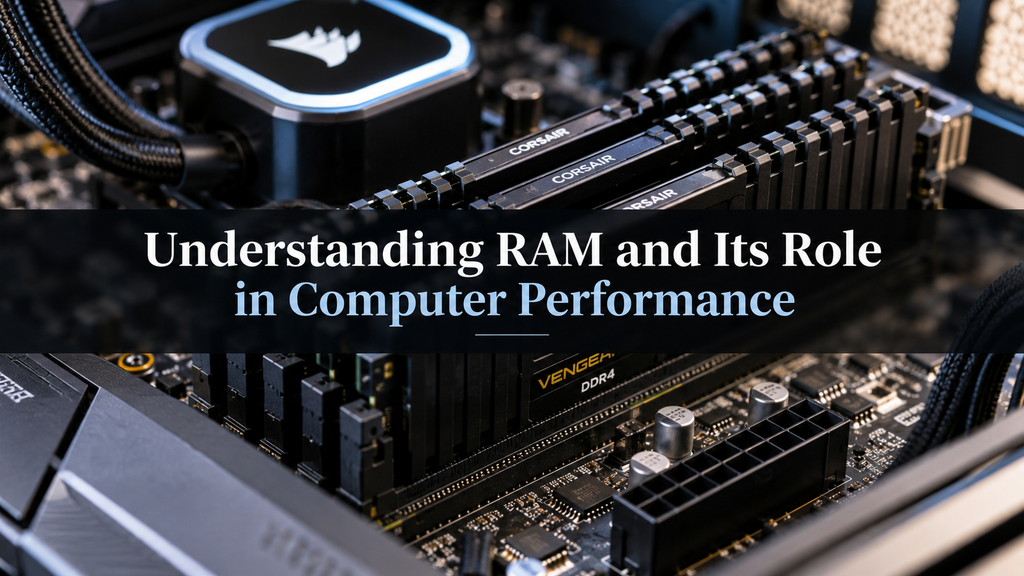
Over the years, RAM technology has improved significantly. Modern computers use a type of RAM called DDR, which stands for Double Data Rate.
Different generations of DDR RAM have been introduced, including DDR3, DDR4, and DDR5. Each new generation provides improvements in speed, efficiency, and performance.
DDR4 RAM became widely used in many computers because it offered better speed and lower power consumption compared to older versions. DDR5 RAM is a newer technology that provides even higher performance and improved efficiency, making it suitable for modern high performance computers.
The type of RAM supported by a computer depends on the motherboard and processor. A system designed for DDR4 cannot usually use DDR5 RAM because the physical design and technology are different.
How Much RAM Do You Need?
The amount of RAM required depends on how you use your computer. Different users have different performance needs.
For basic tasks such as web browsing, checking emails, watching videos, and using office applications, 8GB of RAM is usually enough for many users.
For students, professionals, and people who regularly multitask, 16GB of RAM provides a more comfortable experience. It allows users to run multiple applications without major slowdowns.
For advanced tasks such as video editing, 3D design, software development, and high end gaming, 32GB or more RAM can provide better performance.
Having more RAM does not always mean a computer will automatically become faster. The processor, storage speed, software optimization, and other hardware components also affect performance. However, having insufficient RAM can create serious performance problems.
RAM Speed and Its Importance
RAM capacity is not the only factor that affects performance. RAM speed also plays an important role.
RAM speed is usually measured in megahertz, which indicates how quickly data can be transferred. Faster RAM allows the processor to access information more efficiently, which can improve performance in certain tasks.
Modern processors are designed to work with specific RAM speeds. Using compatible high speed RAM can help improve system responsiveness, especially in demanding applications like gaming, video editing, and professional software.
However, the difference between RAM speeds may not be noticeable during simple daily activities. Users who perform heavy workloads usually benefit more from faster memory.
The Role of RAM in Multitasking
One of the biggest advantages of having enough RAM is improved multitasking ability. Modern users often perform several activities at the same time. They may have multiple browser tabs open, listen to music, attend online meetings, and use productivity applications together.
RAM allows the computer to manage these tasks without constantly slowing down. When there is enough available memory, switching between applications feels smooth and natural.
Without enough RAM, the computer may struggle because it has to move data between RAM and storage repeatedly. This creates delays and makes the system feel less responsive.
For people who use their computers for professional work, having enough RAM can save time and improve productivity.
RAM and Gaming Performance
Gamers often pay close attention to RAM because modern games require significant memory resources. Games store textures, maps, character information, and other data in RAM while running.
A computer with insufficient RAM may experience slow loading, reduced smoothness, or unexpected pauses during gameplay.
However, gaming performance also depends heavily on the graphics card and processor. RAM works together with these components to create a better gaming experience. A balanced system with suitable RAM, a capable processor, and a strong graphics card provides better results.
RAM and Future Computer Needs
Technology continues to advance, and modern applications are becoming more demanding. Websites, creative software, artificial intelligence tools, and games require more resources than before.
Choosing a computer with enough RAM can help extend its useful life. A system with limited RAM may feel fast when it is new but may struggle as software requirements increase over time.
For users planning to keep a computer for several years, investing in sufficient RAM is a practical decision. It provides more flexibility and helps the computer handle future workloads.
Can You Upgrade RAM?
Many desktop computers allow users to upgrade RAM by adding new memory modules. This is one of the easiest ways to improve system performance.
Before upgrading RAM, users should check the maximum supported memory, available slots, and compatible RAM type. Installing incompatible memory may not work properly.
Some laptops have upgradeable RAM, while others have memory permanently attached to the motherboard. Checking the device specifications before purchasing new RAM is important.
A RAM upgrade can significantly improve an older computer, especially if the system frequently becomes slow during normal use.
Common RAM Problems
Although RAM is generally reliable, problems can occur. Faulty RAM modules may cause system crashes, unexpected restarts, or errors while running applications.
Another common issue is insufficient RAM. When too many programs are running at the same time, the computer may slow down because it does not have enough memory available.
Keeping unnecessary applications closed, managing startup programs, and upgrading RAM when needed can help maintain good performance.
Conclusion
RAM is one of the most important components that affects computer performance. It acts as a fast temporary workspace that allows the processor to access the information it needs quickly. From everyday browsing to professional tasks and gaming, RAM helps computers operate smoothly and efficiently.
Understanding RAM and its role in computer performance allows users to make better decisions when buying, upgrading, or maintaining a computer. While RAM is only one part of a complete system, having the right amount and type of memory can greatly improve speed, multitasking ability, and overall user experience.
As software and technology continue to develop, the importance of RAM will continue to grow. A computer with sufficient RAM is better prepared to handle modern applications and future digital demands, making RAM a key factor in building a fast and reliable computing experience.

How Digital Note Taking Tools Organize Information

Understanding AI Chatbots and Their Common Uses

What Generative AI Means for Everyday Computer Users
About The Author
