
Understanding Smartphone Refresh Rates in Simple Terms
Smartphones have changed a lot over the years. Earlier, people mainly cared about calling, messaging, camera quality, and battery life. Today, smartphone buyers also look at display quality, screen brightness, resolution, processor performance, and refresh rate.
The term refresh rate has become very common in smartphone advertisements. You may see phones promoted with 60Hz, 90Hz, 120Hz, or even higher refresh rate displays. These numbers can sound technical, especially if you are not familiar with how screens work.
In reality, the idea is quite simple.
A smartphone refresh rate tells us how many times the screen updates the image every second. A higher refresh rate can make movement on the display look smoother. It affects scrolling, animations, gaming, and the overall feeling of using a phone.
Understanding smartphone refresh rates can help you choose a phone that matches your needs instead of simply buying the model with the biggest number.
What Is a Smartphone Refresh Rate?
The refresh rate of a smartphone screen is the number of times the display refreshes or redraws its image every second.
Refresh rate is measured in Hertz, usually written as Hz.
For example, a smartphone with a 60Hz display refreshes the image on the screen 60 times every second.
A 90Hz display refreshes 90 times every second.
A 120Hz display refreshes 120 times every second.
This happens extremely quickly, so you do not see each individual refresh. Instead, your eyes notice how smooth movement appears on the screen.
The higher the refresh rate, the more frequently the display can show updated images.
This is especially noticeable when you scroll through websites, move between menus, open apps, or play games.
A Simple Way to Understand Refresh Rate
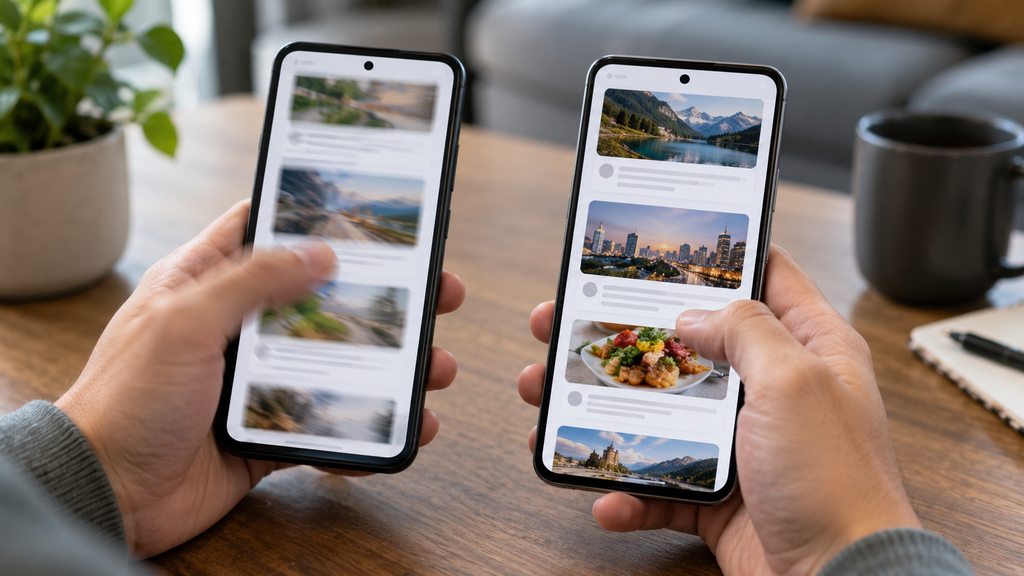
Imagine drawing a moving ball on many pieces of paper.
If you draw only a few pictures of the ball moving from one position to another and quickly flip the pages, the movement may look slightly jumpy.
If you draw many more pictures with smaller changes between each drawing, the movement appears smoother.
A smartphone display works in a somewhat similar way.
A screen with a higher refresh rate updates the visual information more often, so movement can appear more fluid.
This is why a 120Hz phone may feel smoother than a 60Hz phone when scrolling through social media or moving around the phone interface.
What Does 60Hz Mean?
For many years, 60Hz was the normal refresh rate for smartphones, computer monitors, and televisions.
A 60Hz smartphone refreshes its screen 60 times every second.
For basic smartphone use, 60Hz is still perfectly usable.
Activities such as making calls, reading messages, watching many videos, browsing simple websites, using banking apps, and checking email usually work well on a 60Hz screen.
Many people who have always used 60Hz displays may not feel that anything is wrong with them.
The difference becomes easier to notice after using a 90Hz or 120Hz smartphone for some time.
When switching back to 60Hz, scrolling may appear slightly less smooth.
However, this does not mean that 60Hz is bad. It simply provides fewer screen updates per second than higher refresh rate displays.
What Does 90Hz Mean?
A 90Hz display refreshes its image 90 times every second.
It offers a noticeable improvement over 60Hz while often using less power than very high refresh rate modes.
For this reason, 90Hz has become popular in many affordable and mid range smartphones.
Scrolling through social media feeds can feel smoother. App animations may look more polished. Moving between home screen pages can also feel faster.
For many users, 90Hz provides a good balance between smoothness and battery consumption.
If you mainly use your smartphone for normal daily activities and want a smoother experience without focusing heavily on gaming, 90Hz can be more than enough.
What Does 120Hz Mean?
A 120Hz smartphone display refreshes the image 120 times every second.
This can create very smooth screen movement when the software and content support it.
High refresh rate displays are especially noticeable when scrolling quickly through long pages, switching between apps, using smooth system animations, and playing compatible games.
Many modern premium smartphones include 120Hz displays.
Some affordable phones also offer 120Hz screens, although the overall display quality may still differ because refresh rate is only one part of screen performance.
A 120Hz display does not automatically mean that one smartphone has a better screen than another.
Brightness, color accuracy, panel technology, resolution, touch response, and software optimization also matter.
Why Does a Higher Refresh Rate Feel Smoother?
A higher refresh rate reduces the amount of time between each screen update.
At 60Hz, the screen updates approximately every 16.7 milliseconds.
At 120Hz, it updates approximately every 8.3 milliseconds.
The shorter interval allows the display to show changes more quickly.
When you swipe your finger across the screen, the movement can appear to follow your finger more closely.
This creates the feeling of a faster and more responsive smartphone.
Interestingly, the processor itself may not always be dramatically faster. Sometimes the phone simply feels faster because the display is showing animations more frequently.
This is one reason refresh rate has become an important part of smartphone user experience.
Refresh Rate and Scrolling
Scrolling is one of the easiest places to notice refresh rate differences.
Think about how many times you scroll each day.
You scroll through websites, messages, social media posts, photographs, app menus, news stories, and settings.
On a higher refresh rate display, text and images may appear smoother while moving.
This can make the phone feel more polished.
Some people notice the difference immediately, while others need more time before they can clearly see it.
Your sensitivity to refresh rate can depend on your eyesight, the apps you use, and your previous devices.
Refresh Rate and Gaming
Gaming is another area where smartphone refresh rates can be important.
A higher refresh rate can allow compatible games to display more frames each second.
For example, if a game supports 120 frames per second and the smartphone has a 120Hz screen, movement can appear very smooth.
This can be useful in fast moving games where characters, vehicles, or camera views change quickly.
However, a high refresh rate screen alone does not guarantee high frame rate gaming.
The smartphone processor and graphics processor must also be powerful enough to generate those frames.
The game itself must support the higher frame rate.
If a game is limited to 60 frames per second, having a 120Hz display does not automatically make the game run at 120 frames per second.
This is an important point when comparing gaming phones.
Refresh Rate and Frame Rate Are Different
Refresh rate and frame rate are related, but they are not exactly the same thing.
Refresh rate refers to how many times the display can update each second.
Frame rate refers to how many individual images, or frames, the processor and software produce each second.
Frame rate is often measured in frames per second.
Imagine a smartphone with a 120Hz display playing a video that contains 30 frames per second.
The screen is capable of refreshing 120 times each second, but the video itself only provides 30 different frames every second.
The display cannot create completely new video information that does not exist in the original content.
For the smoothest experience, display refresh rate and content frame rate need to work well together.
Does Refresh Rate Improve Video Quality?
Not necessarily.
Many movies and videos are recorded at specific frame rates such as 24, 30, or 60 frames per second.
A 120Hz display may show this content efficiently, but it does not automatically increase the quality of the original video.
Screen quality depends on many factors.
Resolution affects detail.
Brightness affects outdoor visibility.
Contrast affects the difference between dark and bright areas.
Color accuracy affects how natural colors appear.
Panel technology influences black levels, response time, and overall image quality.
Refresh rate mainly affects how smoothly changing images can be displayed.
What Is Adaptive Refresh Rate?
Modern smartphones often use adaptive refresh rate technology.
Instead of keeping the display at the maximum refresh rate all the time, the phone adjusts the rate depending on what you are doing.
For example, while scrolling, the phone may increase the refresh rate for smoother movement.
When reading a page where nothing is moving, the phone may reduce the refresh rate to save power.
During video playback, the refresh rate may adjust to suit the content.
This approach can provide smooth performance while reducing unnecessary battery consumption.
Adaptive refresh rate technology has become especially useful because higher refresh rates can require more energy.
How Refresh Rate Affects Battery Life
A smartphone screen that refreshes more frequently may use more battery power.
When the phone operates continuously at 120Hz, the display and related hardware may need to perform more work than at 60Hz.
The exact battery impact depends on the smartphone.
Some phones are highly efficient.
Others may show a more noticeable difference between standard and high refresh rate modes.
This is why many smartphones allow users to select a refresh rate in the display settings.
You may find options such as Standard, High, Smooth, Adaptive, or Automatic.
Choosing a lower refresh rate can sometimes help extend battery life.
Choosing a higher refresh rate can improve visual smoothness.
Adaptive modes try to provide a balance between both.
Is a Higher Refresh Rate Always Better?
A higher refresh rate sounds better on paper, but the biggest number is not always the best choice for every person.
A 120Hz smartphone with poor software optimization may not feel as smooth as expected.
A well optimized 90Hz smartphone may provide an excellent everyday experience.
You should also consider battery life, display brightness, screen resolution, color quality, processor performance, and price.
For example, if you mainly use your smartphone for calls, messaging, reading, and occasional video watching, a very high refresh rate may not be essential.
If you enjoy gaming, fast scrolling, animation, and a highly responsive interface, a higher refresh rate may matter more.
Can Everyone Notice the Difference?
People have different levels of sensitivity to screen smoothness.
Some users can quickly identify the difference between 60Hz and 120Hz.
Others may notice only a small improvement.
The difference can become more obvious after using a higher refresh rate smartphone for several days.
Your eyes and brain become familiar with smoother movement.
When you return to a 60Hz display, animations may suddenly seem less fluid.
However, this does not mean that everyone needs a high refresh rate phone.
Personal preference remains important.
Refresh Rate and Touch Sampling Rate
Refresh rate is sometimes confused with touch sampling rate.
They are different measurements.
Refresh rate describes how often the display updates the image.
Touch sampling rate describes how often the screen checks for touch input from your finger.
A higher touch sampling rate can make a device react more quickly when you tap or swipe.
This can be particularly useful for mobile gaming.
For example, a phone may have a 120Hz refresh rate but a touch sampling rate of 240Hz or higher.
These numbers measure different parts of the smartphone experience.
Refresh rate controls visual updates.
Touch sampling rate affects how quickly touch input is detected.
Does Screen Type Matter?
Yes.
Refresh rate should not be considered alone.
The type of display panel can strongly affect screen quality.
Two common smartphone display technologies are LCD and OLED.
OLED displays can produce deep black levels because individual pixels can turn off completely.
They can also provide strong contrast and vivid colors.
LCD displays use a backlight behind the screen.
Modern LCD panels can still look very good, especially on well designed devices.
A 120Hz LCD display and a 120Hz OLED display may both refresh 120 times each second, but their overall appearance can be different.
Brightness, contrast, response time, resolution, and color tuning all contribute to the final viewing experience.
Common Smartphone Refresh Rates
Smartphones currently use several common refresh rates.
60Hz remains suitable for basic and budget devices.
90Hz provides smoother movement without always requiring maximum power consumption.
120Hz is widely used in modern mid range and premium smartphones.
Some gaming focused smartphones may support even higher refresh rates.
However, going beyond 120Hz may produce smaller noticeable improvements for ordinary users.
The difference between 60Hz and 120Hz is usually easier to notice than the difference between 120Hz and extremely high refresh rates.
This is an example of diminishing returns.
As numbers continue increasing, each additional improvement may become less obvious during normal use.
How to Check Your Smartphone Refresh Rate
Most modern Android smartphones provide refresh rate options inside display settings.
The exact menu depends on the manufacturer.
You can usually open Settings and look for Display.
Inside that section, search for terms such as Refresh Rate, Motion Smoothness, Screen Refresh Rate, or Smooth Display.
Some phones allow you to choose between standard and high refresh rate modes.
Others automatically control the refresh rate.
The manufacturer specification page can also tell you the maximum supported refresh rate of your smartphone.
Should You Keep High Refresh Rate Enabled?
For many users, keeping a high or adaptive refresh rate enabled provides the best experience.
Scrolling feels smoother, animations appear more natural, and the phone can feel more responsive.
However, if battery life is your main concern, reducing the refresh rate may help.
The difference depends on your phone and usage habits.
You can test both settings for a few days.
If the battery difference is small, you may prefer the smoother setting.
If high refresh rate noticeably reduces your battery life, adaptive or standard mode may be a better option.
There is no single setting that is perfect for everyone.
What Refresh Rate Should You Look for When Buying a Phone?
When buying a smartphone, refresh rate should be considered together with other specifications.
For basic smartphone users, 60Hz can still handle ordinary tasks.
For someone who wants smoother scrolling while keeping the price reasonable, 90Hz can offer a good experience.
For gaming, premium phones, or users who value very smooth motion, 120Hz is an attractive option.
Do not choose a phone based only on refresh rate.
A good smartphone should provide balanced performance.
Processor speed, battery life, software support, camera quality, storage, display brightness, resolution, build quality, and price can be just as important.
A phone with excellent overall performance and a 90Hz display may be a better purchase than a poorly optimized phone that advertises 120Hz.
Why Smartphone Refresh Rates Matter More Today
Modern smartphone interfaces contain many animations and gestures.
People frequently scroll through social media, browse websites, watch short videos, switch between apps, and play mobile games.
Because so much smartphone interaction involves movement, display smoothness has become more noticeable.
Manufacturers have responded by bringing high refresh rate displays to a wider range of devices.
What was once considered a premium feature can now be found in many affordable phones.
As display technology continues improving, adaptive refresh rates and energy efficient panels are likely to become even more common.
Final Thoughts
Understanding smartphone refresh rates does not require deep technical knowledge.
The basic idea is simple.
Refresh rate tells you how many times a smartphone display can update its image every second.
A 60Hz display updates 60 times per second.
A 90Hz display updates 90 times.
A 120Hz display updates 120 times.
Higher refresh rates can make scrolling, animations, and compatible games appear smoother.
However, refresh rate is only one part of smartphone display quality.
Battery life, processor performance, screen technology, resolution, brightness, software optimization, and content frame rate also play important roles.
For most people, the best smartphone is not necessarily the one with the highest refresh rate. It is the device that provides the right balance of smoothness, battery efficiency, performance, display quality, and price.
Once you understand what smartphone refresh rates actually mean, specifications such as 60Hz, 90Hz, and 120Hz become much easier to compare.
Instead of seeing refresh rate as another confusing technical number, you can view it as a simple measurement of how frequently your smartphone screen updates what you see.
How Smartphone Battery Capacity Affects Daily Usage
Why Some Smartphones Receive Software Updates for Longer

What Makes a Smartphone Camera Useful in Everyday Photography
About The Author
