
How Mobile Operating Systems Manage Background Apps
Modern smartphones can perform many tasks at the same time. You may be listening to music, receiving messages, downloading a file, checking email, and using a navigation app within the same few minutes. Even when some of these apps are not visible on the screen, they may still be doing certain work in the background.
This ability is controlled by the mobile operating system. Android and iOS both have systems that decide when an app can stay active, how much memory it can use, when it should be paused, and when it should be completely removed from memory.
Understanding how mobile operating systems manage background apps can help users understand why some apps continue working after they leave the screen while others stop almost immediately. It also explains how smartphones balance performance, battery life, memory, security, and user convenience.
What Are Background Apps?
A background app is generally an application that is not currently visible on the main screen but may still have some activity taking place.
For example, imagine that you open a music application and start playing a song. You then return to the home screen and open a web browser. The music continues playing even though the music app is no longer visible.
In this situation, part of the music application is allowed to continue operating in the background.
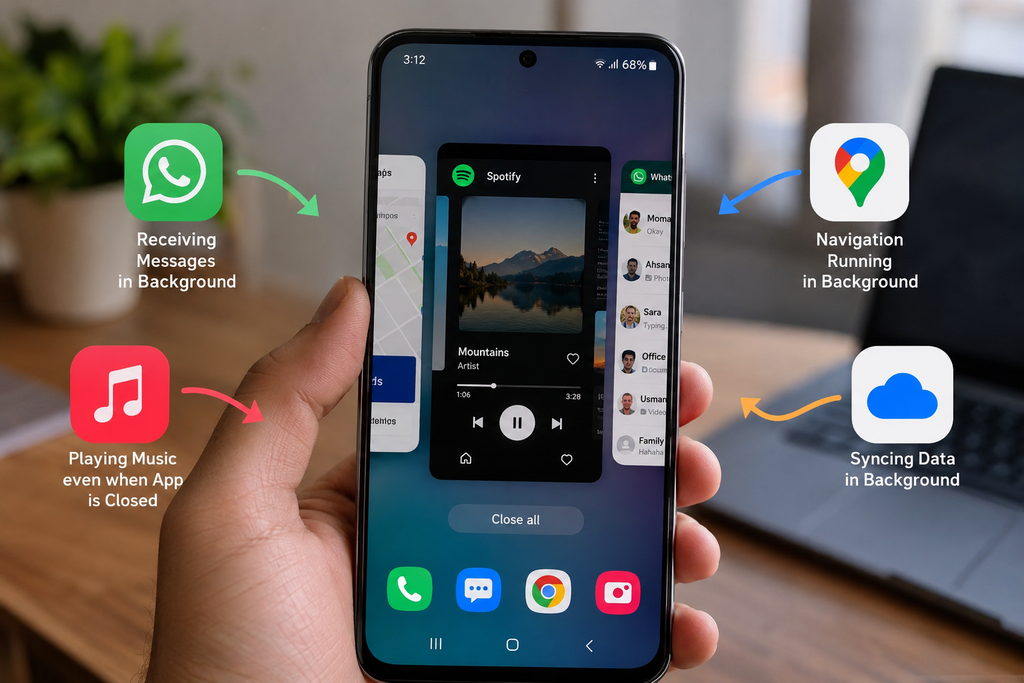
Other common examples include messaging applications receiving new messages, email apps checking for updates, cloud storage services uploading photographs, navigation applications tracking a route, and fitness applications recording activity.
However, an application being listed among your recent apps does not always mean that it is actively running.
In many cases, the operating system keeps some information about the application in memory so that it can reopen quickly without continuously using the processor.
Why Background App Management Is Important
Smartphones have limited resources.
Although modern phones may contain powerful processors and large amounts of memory, they still depend on batteries. Allowing every installed application to run continuously would quickly reduce battery life and could make the device slower.
The operating system therefore acts like a manager.
It decides which applications need access to system resources and which applications can temporarily wait.
The main resources being managed include memory, processor activity, battery power, network access, location services, and background permissions.
Good background management helps create a balance between convenience and efficiency.
Users want notifications to arrive quickly, music to continue playing, and navigation to keep working. At the same time, they also expect their battery to last throughout the day.
Mobile operating systems are designed to manage both needs.
How an App Moves Between Different States
Applications usually move through different states depending on what the user is doing.
When you open an application and interact with it, the app is in the foreground. It normally receives a high level of access to system resources because the operating system knows that the user is actively using it.
When you leave the application, the operating system may move it into a background state.
At this point, the app may still be allowed to finish certain important tasks.
After some time, the operating system may suspend the app. A suspended application usually remains stored in memory, but it performs little or no processor activity.
If memory is required for another task, the operating system may remove the suspended app from memory completely.
When you open the app again, it may either continue from its previous state or load again from storage.
This entire process usually happens automatically.
The Role of RAM in Background App Management
RAM is one of the most important parts of background app management.
When an application is opened, some of its information is loaded into RAM. Accessing information from RAM is much faster than loading everything again from permanent storage.
Because of this, operating systems often try to keep recently used applications in memory.
Keeping an app in RAM does not necessarily mean that it is actively consuming a large amount of battery power.
A suspended app may simply remain stored there so that it can reopen quickly.
This is why manually closing every application is not always necessary.
Modern mobile operating systems are designed to decide when memory should be released.
If another application needs more RAM, the operating system can remove less important background applications from memory.
How Android Manages Background Apps
Android uses several techniques to manage applications running in the background.
The system considers how important each application is at a particular moment.
An app that the user is actively viewing receives high priority. An app playing music or providing navigation may also receive special priority because the user expects these services to continue.
Applications that have not been used recently may receive lower priority.
When memory becomes limited, Android can remove lower priority applications before removing important ones.
Android also includes battery management technologies that reduce unnecessary background activity.
For example, when a phone has been sitting unused for some time, Android can limit how frequently certain applications access the network or perform background work.
This helps prevent applications from repeatedly waking the processor when the user is not actively using the phone.
Android Doze Mode
One important Android battery management feature is commonly known as Doze.
The idea behind Doze is simple.
If the phone has not been actively used for a period of time, the operating system reduces certain types of background activity.
Applications may have fewer opportunities to connect to the internet or perform scheduled work.
The device periodically allows some background tasks to take place before returning to a lower power state.
This approach can reduce unnecessary battery consumption while still allowing applications to complete important background operations.
Apps with genuine requirements can use approved system methods to handle urgent tasks.
App Standby on Android
Android also pays attention to how frequently applications are used.
An application that has not been opened for a long period may receive stronger background restrictions than an application used every day.
This makes sense because rarely used applications usually do not need the same level of background access as frequently used services.
The operating system can limit their network activity and background processes until the user opens them again.
This method helps reduce battery consumption caused by forgotten applications.
Background Services on Android
Some Android applications need to perform work even when their main screen is not open.
These applications may use services.
A service is a component designed to perform certain tasks without requiring constant interaction from the user.
Music playback is a good example.
The user may leave the music application while the playback service continues.
However, modern Android versions place restrictions on background services because developers could previously use them in ways that caused unnecessary battery drain.
For important ongoing work, applications may use a foreground service. These services usually display a visible notification so that the user knows an application is performing an ongoing task.
How iOS Manages Background Apps
Apple’s iOS also uses strict background management.
When a user leaves an application, iOS normally gives the app a short amount of time to complete important work.
After that, the application may be suspended.
A suspended iPhone application is generally kept in memory but is not continuously using the processor.
This allows the app to reopen quickly while reducing unnecessary energy consumption.
If the system needs more memory, iOS can remove suspended applications.
When the user opens one again, the application may need to reload.
Like Android, iOS provides specific methods for applications that genuinely need background capabilities.
Background Activities Allowed on iOS
iOS does not normally allow every application to run freely in the background.
Instead, apps can request permission or use approved background features for particular types of tasks.
Examples include audio playback, location tracking, internet calling, file transfers, and certain data updates.
This controlled approach helps prevent applications from performing unlimited background activity.
An application must use the methods provided by the operating system.
As a result, iOS can closely control how much processor time and battery power an application uses.
Background App Refresh
iPhones include a feature known as Background App Refresh.
This feature allows compatible applications to update some of their content while the user is not actively viewing them.
For example, a news application may update its latest stories before you open it.
When you later launch the application, newer content may already be available.
However, Background App Refresh does not mean that every application is running continuously.
The operating system still decides when background activity should occur.
Users can also control this feature through their device settings.
How Push Notifications Reduce Background Activity
Notifications are another clever part of mobile background management.
An application does not necessarily need to remain active all day to receive a new message.
Instead, many applications use push notification systems.
A remote server communicates with the notification service operated by the mobile platform.
The operating system then delivers the notification to the phone.
This is much more efficient than having every application constantly connect to its own server and ask whether something new has happened.
Push notifications therefore help reduce unnecessary network and processor activity.
How Background Apps Affect Battery Life
Background applications can affect battery life when they perform frequent tasks.
Activities that may consume noticeable power include using GPS, transferring large amounts of data, recording audio, uploading files, constantly checking location, or frequently waking the processor.
However, simply seeing an application in the recent apps screen does not mean that it is consuming significant battery power.
A suspended application may use almost no processor resources.
The operating system tries to keep unnecessary background activity under control.
Users can usually check battery settings to see which applications are consuming the most energy.
If one application shows unusually high background activity, its permissions or settings may be worth checking.
Why Some Apps Reload When You Open Them Again
Many smartphone users notice that an application sometimes returns exactly where they left it, while other times it starts again from the beginning.
This usually relates to memory management.
Suppose you open several large applications, play a game, edit a video, and use the camera.
These activities may require a large amount of RAM.
To provide enough memory for the application currently being used, the operating system may remove older background apps from RAM.
When you return to one of those applications, it has to load again.
Phones with more RAM may be able to keep more applications ready in memory, although operating system design also plays an important role.
Why Closing Every App Is Usually Unnecessary
Some users regularly open the recent apps screen and close every application because they believe it will always save battery.
Modern operating systems are designed to manage applications automatically.
Removing an application from recent memory may sometimes mean that it has to fully reload the next time it is opened.
Loading the application again can require processor activity and storage access.
There are situations where closing an app is useful, especially if the application is frozen, behaving incorrectly, or using excessive resources.
However, constantly closing every app is generally not required for normal smartphone use.
Allowing the operating system to manage memory is usually the simpler approach.
Background Permissions and Privacy
Background app management is not only about battery life.
It is also connected to privacy.
Some applications may request permission to access location, microphones, cameras, photographs, contacts, or other information.
Modern operating systems provide users with more control over these permissions.
For example, location access may sometimes be limited to periods when the application is being actively used.
This prevents an application from continuously accessing location information unless there is a genuine need and the appropriate permission has been granted.
Operating systems may also display indicators when sensitive hardware such as the microphone or camera is being used.
These controls make background activity more transparent.
How Developers Design Apps for Background Work
Application developers need to follow the background rules established by the operating system.
Instead of allowing a program to run endlessly, developers are encouraged to schedule work efficiently.
For example, an app may combine several updates into one task instead of waking the phone repeatedly.
Cloud applications may wait for suitable network conditions before uploading large files.
Other apps may perform tasks when the phone is charging.
These methods can reduce energy consumption.
Efficient application design benefits both the user and the operating system because fewer resources are wasted.
Battery Saver Modes and Background Apps
Most smartphones include some type of battery saving mode.
When this mode is enabled, the operating system may place additional restrictions on background activity.
Some apps may update less frequently.
Animations may be reduced.
Automatic synchronization may occur less often.
Certain performance features may also be limited.
The purpose is to extend the remaining battery life by reducing activities that are not immediately necessary.
Important functions such as phone calls and essential notifications usually continue working.
Can Users Control Background Apps?
Both Android and iOS provide settings that allow users to control some background behavior.
Users may be able to restrict background data, disable background refresh, change battery optimization settings, adjust location permissions, or prevent certain applications from using specific features.
These controls can be useful when an application consumes more battery or mobile data than expected.
However, applying very strict background restrictions can sometimes affect notifications and synchronization.
For example, a heavily restricted messaging application may deliver messages later than expected.
It is therefore better to change background settings only when there is a clear reason.
How Artificial Intelligence Helps With App Management
Modern smartphones increasingly use intelligent software to understand usage patterns.
The operating system can observe which applications are opened regularly and which ones are rarely used.
It can then adjust resource allocation accordingly.
Frequently used applications may be kept ready for faster access, while applications that have not been opened for weeks may face stronger background restrictions.
These systems do not require users to manually manage every process.
Instead, the phone gradually adapts to normal usage patterns.
As mobile hardware and software continue to improve, background management is likely to become even more efficient.
The Balance Between Performance and Battery Life
Managing background apps is ultimately about balance.
If an operating system removed every app immediately after the user left it, battery use might be reduced in some situations, but switching between applications would feel slower.
If every application were allowed to run continuously, multitasking might appear convenient, but battery life and overall performance could suffer.
Modern operating systems try to find a middle point.
They keep useful information in memory, suspend unnecessary processes, allow important services to continue, and restrict applications that consume resources without a clear reason.
This balance is one of the reasons smartphones can perform many tasks while still providing reasonable battery life.
Conclusion
Mobile operating systems manage background apps through a combination of memory control, process priority, battery optimization, permissions, notifications, and scheduled background tasks.
Android and iOS use somewhat different methods, but their main goal is similar. They try to keep the phone responsive while preventing unnecessary battery and resource consumption.
An application visible in the recent apps screen is not necessarily running continuously. It may simply be suspended in memory and waiting for the user to return.
The operating system decides when applications should remain active, when they should be paused, and when they should be removed from memory.
Understanding this process can help smartphone users make better decisions about battery settings, app permissions, background data, and device performance.
Instead of constantly managing every application manually, users can usually rely on the operating system to handle most background activity automatically.
As smartphones become more powerful and mobile software becomes more intelligent, background app management will continue to improve. The basic goal will remain the same: allowing useful tasks to continue when needed while protecting battery life, performance, privacy, and the overall user experience.
Frequently Asked Questions
Do background apps use battery?
Some background apps can use battery when they perform tasks such as location tracking, data transfers, audio playback, or synchronization. However, a suspended app stored in memory may use very little power.
Should I close all background apps?
Usually, it is not necessary to close every application manually. Modern mobile operating systems automatically manage memory and background processes. Closing an app can be useful when it becomes unresponsive or behaves incorrectly.
Why does my phone automatically close apps?
Your phone may remove applications from memory when RAM is needed for other tasks. This is a normal part of mobile memory management.
Does having more RAM improve background app performance?
More RAM can allow a smartphone to keep more applications ready in memory. However, operating system optimization and application design also affect background performance.
What is Background App Refresh?
Background App Refresh is an iOS feature that allows supported applications to update certain information while they are not actively displayed on the screen.
Can background apps use mobile data?
Yes. Some applications may transfer information using mobile data in the background. Android and iOS provide settings that can help users manage background data usage.
Does battery saver stop background apps?
Battery saving modes usually restrict some background activity, but they do not necessarily stop every application. Important tasks and notifications may continue depending on the operating system and application settings.
SEO Information
Primary Keyword: How Mobile Operating Systems Manage Background Apps
Secondary Keywords: background apps, mobile operating systems, Android background apps, iOS background apps, smartphone background processes, background app management, mobile battery optimization, smartphone RAM management
Meta Title: How Mobile Operating Systems Manage Background Apps
Meta Description: Learn how mobile operating systems manage background apps, RAM, battery usage, notifications, permissions, and performance on Android and iOS devices.
Suggested URL Slug: how-mobile-operating-systems-manage-background-apps

How Smartphone Processors Affect Everyday Performance

Why Some Smartphones Receive Software Updates for Longer

Practical Ways to Keep a Smartphone Running Smoothly
About The Author
